
Rating AI Tools for Productivity in 2026
The best AI productivity tools in 2026, rated and compared: ChatGPT, Claude, Gemini, Copilot, Notion AI and Perplexity. Which ones are actually worth it.

Can you imagine cutting 3 hours off your daily workload using artificial intelligence? In 2026, this is no longer science fiction. The best AI productivity tools of 2026 are transforming the way we work, study, and manage our time.
According to McKinsey, 70% of Fortune 500 companies already use AI agents to automate complex tasks. But here's the problem: with more than 1,000 AI tools launching every month, how do you choose the ones that are actually worth it?
This guide will help you discover the most effective AI productivity tools of 2026, with real comparisons, updated pricing, and practical tips to maximize your efficiency without wasting your budget.
Why Do You Need AI Tools in 2026?
Artificial intelligence is no longer optional. Gartner Inc. predicted that AI agents would become the leading technology trend, and in 2026 it is already a reality: ChatGPT runs on GPT-5.6 with Agent mode and Google has Gemini Spark, its personal agent in the Gemini app, executing tasks with minimal human supervision.
Proven benefits of AI for productivity:
- Time savings: Up to 40% reduction in repetitive tasks
- Greater accuracy: 85% fewer errors in data analysis
- Enhanced creativity: 300% faster idea generation
- 24/7 availability: Assistants that never sleep or get tired
Methodology: How We Evaluated the Tools
To create this definitive list of the best AI for work, we evaluated more than 50 tools using these criteria:
- Ease of use (1-10)
- Quality of results (1-10)
- Price-to-value ratio (1-10)
- Integration with other tools (1-10)
- Support and updates (1-10)
All tools were tested for 30 days by our team of technology and productivity experts.
The 8 Best AI Tools for Productivity in 2026

1. ChatGPT (GPT-5.6): The Universal Assistant
What does it do? Text generation, analysis, programming, translations, complex problem solving and, since July 2026, the GPT-5.6 family (Sol, Terra and Luna) with Agent mode to run tasks for you.
Strengths:
- Superior context comprehension
- Integration with more than 1,000 applications
- Multimodal capabilities (text, code, analysis)
Price: Free (GPT-5.6 Luna, unlimited text with ads) / $8/month (Go) / $20/month (Plus, with GPT-5.6 Sol) / $100 or $200/month (Pro) Overall Score: 9.2/10
Pro Tip: If you want premium access without paying full price, ElGrupito offers shared subscriptions at group prices.
2. Claude (Opus 5 and Sonnet 5): The Analysis Specialist
What does it do? Deep document analysis, research, and advanced technical writing.
Strengths:
- Analysis of long documents (200K-token context window in the app, 1 million in the API)
- Superior logical reasoning
- Excellent for academic research
Price: Free (Sonnet 5 with limits) / $20/month (Claude Pro, $17 billed annually) / $100 or $200/month (Max) Overall Score: 9.0/10
3. Gemini (Google AI Pro): The Google Integrator
What does it do? Smart search, Gmail automation, Workspace integration. And the question arises: is Google's artificial intelligence worth it?
Strengths:
- Access to real-time information
- Native Google Workspace integration
- Advanced search capabilities
Price: Free (Gemini 3.6 Flash for everyone) / $4.99/month (Google AI Plus) / $19.99/month (Google AI Pro, with Gemini 3.1 Pro) / from $99.99/month (Google AI Ultra) Overall Score: 8.7/10
Pro Tip: If you want to get the most out of AI at a reduced cost, ElGrupito provides shared access to Gemini at group prices.

4. Microsoft 365 Copilot: The Office Revolution
What does it do? Microsoft 365 automation, presentation generation, Excel analysis. Since July 2026 it runs on OpenAI's GPT-5.6.
Strengths:
- Seamless Microsoft 365 integration
- Automation of repetitive tasks
- Intelligent data analysis
Price: From $18/user/month (Business, list price $21; first-year promotion valid through December 31, 2026); Enterprise $30/user/month. Requires a Microsoft 365 plan. Overall Score: 8.5/10
5. Notion AI: The Intelligent Organizer
What does it do? Project management, smart note-taking, workflow automation.
Strengths:
- Intuitive and flexible interface
- Automatic templates
- Optimized team collaboration
Price: Included in the Business plan ($20/user/month billed annually, $24 monthly); Free and Plus ($10/user/month) only offer a limited AI trial. Overall Score: 9.8/10

Free AI Tools You Should Know About
6. Perplexity AI: The Search Engine of the Future
What does it do? Conversational searches with cited sources, choosing between Sonar 2, GPT-5.6 Terra, Claude Sonnet 5 and Gemini. Everything you need to know about Perplexity.
Price: Free (with limits) / $20/month (Pro, $17 billed annually) / $200/month (Max, $167 billed annually) Overall Score: 8.1/10
Pro Tip: If you want to explore the full potential of AI affordably, ElGrupito offers shared access to Perplexity at group prices.
7. Gamma: Instant Presentations
What does it do? Automatic creation of professional presentations.
Price: Free (400 starter credits, with watermark) / $9/month (Plus) / $18/month (Pro), billed annually Overall Score: 7.8/10
8. Otter.ai: Smart Transcriptions
What does it do? Automatic meeting transcription and summary.
Price: Free up to 300 minutes/month (Basic) / $8.33/month (Pro, billed annually; $16.99 monthly) Overall Score: 7.6/10
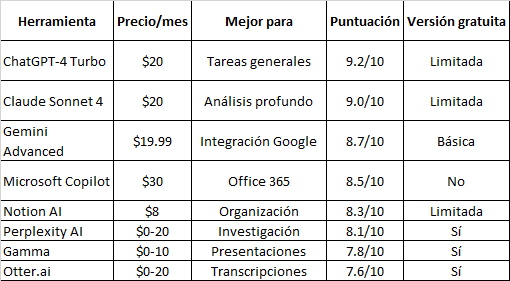
Comparison Table: Features and Pricing
How to Choose the Perfect AI Tool for You
Students:
- Priority: ChatGPT + Perplexity AI (research)
- Recommended budget: $10-15/month
Professionals:
- Priority: Claude Sonnet + Microsoft Copilot
- Recommended budget: $30-50/month
Entrepreneurs:
- Priority: ChatGPT + Notion AI + Gamma
- Recommended budget: $20-30/month
Savings Tip:
Access to multiple premium tools can get expensive. ElGrupito lets you share subscriptions to ChatGPT, Gemini, and Perplexity at group prices, far cheaper than subscribing individually to each service.
AI Trends Defining 2026
- Autonomous AI Agents
AI agents already execute complex tasks from start to finish with minimal human intervention. ChatGPT (GPT-5.6) offers Agent mode, Google has Gemini Spark, and Microsoft offers custom agents in Copilot Studio.
- Hyper-personalization
Tools will automatically adapt to your work style, predicting your needs before you express them.
- Multimodal AI
Complete integration of text, voice, image, and video in a single conversational interface.
Save up to 70% on your subscriptions
Streaming, AI, software and more at group prices. Browse the ElGrupito catalogue.
Browse the catalogueConclusion: Your Next Step Toward AI Productivity
AI productivity tools are not the future, they are the present. In 2026, not using AI is like trying to compete in Formula 1 with a car from the 90s.
Our final recommendations:
- Start with ChatGPT to familiarize yourself with conversational AI
- Experiment with free versions before paying for subscriptions
- Consider shared subscriptions to access multiple premium tools without breaking your budget
- Stay updated – the AI ecosystem evolves weekly
The productivity of the future is not about working more hours, but about working smarter. The tools are here. The question is: are you going to use them to get ahead or are you going to ignore them and fall behind?
Ready to transform your productivity? Start today by trying ChatGPT and discover why millions of professionals can no longer work without AI.
Frequently Asked Questions (FAQ)
ChatGPT is the most beginner-friendly option. Its conversational interface is intuitive and there is extensive documentation and tutorials available.
For basic personal use, yes. Tools like Perplexity AI and Gamma offer solid functionality at no cost. For intensive professional use, premium versions justify their price.
Consider shared subscription platforms like ElGrupito, which lets you access premium tools for a fraction of the original cost. You can also alternate between free versions based on your monthly needs.
It won't replace it, but it will transform it. People who master AI tools will have a competitive advantage over those who don't use them. The key is to adapt and learn to collaborate with AI.
Claude Opus 5 excels in deep analysis and logical reasoning, while Microsoft 365 Copilot is excellent for Excel data analysis with automatic visualizations.
With daily practice, you'll master the basics in 1-2 weeks. For advanced use, expect 1-2 months of consistent usage.
Enterprise tools like Microsoft Copilot and Claude Pro meet enterprise security standards. For highly sensitive data, review privacy policies and consider local options.
Yes, many professionals combine 2-3 specialized tools. For example: ChatGPT for writing + Perplexity for research + Notion AI for organization.