
How to Download Music from Spotify for FREE
How to download music from Spotify for free and with Premium in 2026: official step-by-step methods, online downloaders and tricks to listen offline.
Have you ever wondered how to enjoy your favorite music without relying on an internet connection? In the streaming era, the ability to download music from Spotify has become a fundamental need for music lovers who want total freedom in their listening experience.
From official Spotify Premium options to clever alternatives for free users, we'll explore all the possibilities available so you can take your music library wherever you go. Discover how to maximize your music experience and optimize the storage of your favorite songs without any hassle.
How to Download Music from Spotify Step by Step [With and Without Premium]
Downloading Songs with Spotify Premium: Official Process
Spotify Premium offers a superior experience: you can listen to music without ads, skip songs without limits, play content in high quality, and use the app in offline mode whenever you need. Learn about all the features of the Spotify Premium individual plan here.
To enjoy your favorite tracks offline, you need a Premium subscription that lets you store up to 10,000 songs on your device. The process is simple, and you can do it with both individual songs and complete albums.
💡 Want downloads without restrictions? At ElGrupito you can get Spotify Premium at a group price.
Downloading Individual Songs (Via Playlists)
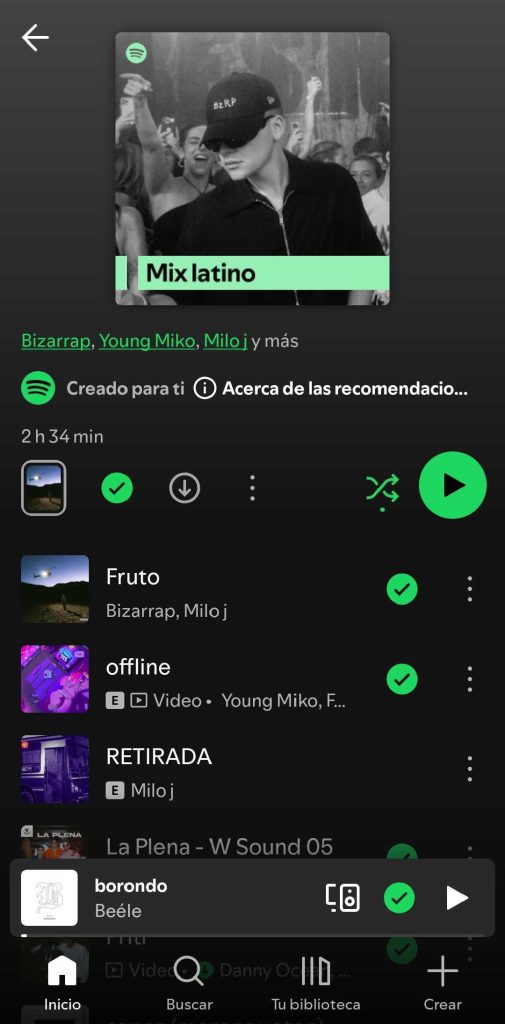
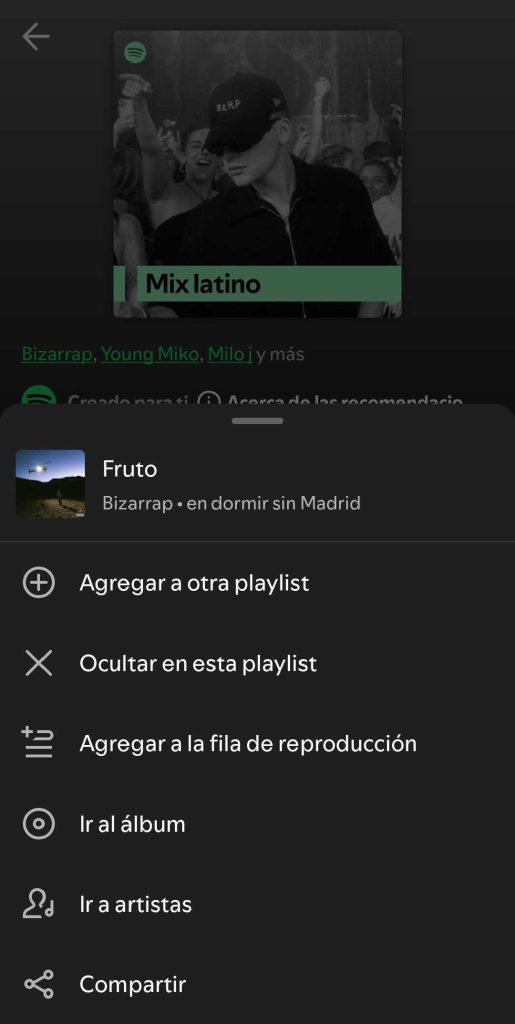
Although Spotify Premium doesn't allow you to download individual songs directly, there's a practical way to do it: adding them to a personalized playlist. This way you can enjoy your favorite tracks offline. Follow these steps:
- Make sure you're connected to the internet with your active Premium account
- Find the song you want to save
- Tap the three dots next to the title and select "Add to playlist"
- Create a new playlist (for example, "My favorite songs") or choose an existing one
- Go to your library, open the playlist, and press the "Download" button
- Done! You've now downloaded a Spotify playlist to your device
Once the download is complete, you'll see a green icon next to the songs indicating they're available offline. You can also check the download status at the top of the playlist.
How to Download a Spotify Playlist
Prefer to download Spotify playlists that already exist? It's even easier:
- Find the desired playlist or album
- Tap the download button next to the title
- Wait for all files to save automatically
Where to Find Your Downloaded Songs Offline
Finding your downloaded songs is super easy:
- Go to "Your Library" in the app
- Select "Downloaded"
- Done! Now you can play your favorites without internet
How to Enable Offline Mode on Spotify
To maximize your offline experience and listen to Spotify music without a connection:
- Enable "Offline mode" in settings
- Enjoy your downloaded songs without using data
- Sync your library by occasionally connecting to the internet
Remember that you can adjust the audio quality of downloads based on your preference and available device space.
Can't Download Songs? Common Solutions
If you get the message "Content could not be downloaded", don't worry. Here's a list of tips to resolve it quickly:
- Check your internet connection
- Verify available space: It's recommended to have at least 1 GB of free memory on your device.
- Device limit: remember you can only download content on up to 5 different devices. If you've reached the limit, delete downloads from another device before continuing.
- If the download is interrupted more than once, try disabling any battery saver or automatic cache cleaning apps
- Restart the Spotify app: Many times, a simple restart fixes temporary issues without needing to reinstall.
- Reinstall the app if nothing works: as a last resort, delete the app and reinstall it.
Keep in mind that doing so will erase your downloaded playlists and podcasts, so you'll need to re-download your Spotify music afterward.
What Can I Download from Spotify for Free?
The free version of Spotify comes with significant restrictions. Users without Premium can only download podcasts, must listen to songs with an internet connection, and put up with ads between songs. Among the main drawbacks of the free version are the inability to download music and the constant presence of ads. On the other hand, there are alternatives for those who want to download from Spotify for free and save playlists for offline listening.
Best Free Online Spotify Downloaders 2026
For users looking to download music without a paid subscription, the market offers various tools and online downloaders, such as spotify downloader, tunecable spotify downloader, spotify downloader.com, spotifymate, spotidown, soundloaders, keepvid.
How Online Spotify MP3 Downloaders Work
Many of these downloaders work directly from the website, without the need to install additional applications, and are compatible with browsers like Google Chrome and other popular browsers, offering cross-platform compatibility.
Step by Step: Downloading Music with an Online Converter
The process for downloading Spotify songs is usually straightforward and consists of the following steps:
- Find the Spotify song, podcast, album, or track you want to download
- Copy the corresponding link
- Paste the link into the search box on the homepage of the chosen tool or downloader like spotify downloader.com
- Select MP3 format or another available format
- Click to start the file download
Advantages and Risks of Using Free Downloaders
These tools have pros such as allowing you to download complete songs, playlists, podcasts, and albums from Spotify. Downloaded files can be played on your PC and easily organized by name. Additionally, many of these programs preserve ID3 tags, which include information like artist name, song title, album, and cover art, making it easy to keep your music library well-structured.
But during the download process, some issues may arise, such as incomplete files or pop-up ads. That's why it's recommended to check the file quality once the download is finished. Some of these tools also offer the option to extract audio files from other platforms, like YouTube, which considerably expands your download possibilities.
Most of these services are accessible from any browser and don't require installation. They offer a straightforward website for converting, downloading music and podcasts in formats like MP3, ensuring compatibility with different devices and ease of use. There are also online comparisons that help you choose the best option, considering criteria such as format variety, speed, and ease of organizing your playlist.
Is It Legal to Download Music from Spotify Using External Downloaders?
It's important to know that online MP3 downloaders may have certain drawbacks such as not being safe, legal, or reliable. It's essential to understand that using third-party tools to download music can have consequences:
- Risk of Spotify account suspension
- Violating copyright and facing legal consequences
- Potential security issues on your device
- Potentially lower audio quality
Storage and Organization
When downloading songs through alternative methods, consider:
- Creating a structure of organized folders to store your downloaded files
- Make sure downloaded files retain their ID3 tags, such as artist name, album, or cover art, as this makes it easier to keep your library organized and easy to browse.
- Making regular backups
- Checking the available space on your device
Remember that the safest and most legal way to enjoy music offline is through a Premium subscription, which also guarantees the best audio quality and full control over your playlist.
Spotify Premium at a Group Price: How ElGrupito Works
Would you like to have Spotify Premium without paying the $12.99 monthly fee? With ElGrupito you can access all the benefits of a premium account at a group price, thanks to their 100% legal and secure shared subscription system. You'll enjoy ad-free music, unlimited downloads, and high-quality audio for a fraction of the official price.
Thousands of users are already saving every month thanks to this smart and reliable option. Plus, the process is very simple: you sign up, make the payment, and you're done! Start enjoying the full Spotify experience without breaking the bank. If you want the best of Spotify for much less, ElGrupito is the perfect gateway to a premium and affordable music service.

Tips and Tricks to Optimize Your Spotify Downloads
How to Improve Downloaded Audio Quality
Adjust audio quality according to your needs:
- High quality: Ideal for audiophiles, but takes up more space
- Normal quality: Perfect balance between sound quality and storage
- Low quality: Optimal for saving space, sacrificing fidelity
Organize Your Spotify Library Like a Pro
To keep your downloaded music perfectly organized, create themed playlists from time to time: music for working out, for working, for relaxing, podcasts to listen to in the car. Use the "Filter" function to quickly locate your offline songs. Also, make sure songs retain their ID3 tags, such as title, artist, and album, as this makes it easier to search and organize your downloaded music. A well-organized playlist will save you time and frustration when looking for that specific song you need to hear.
Manage Space and Storage Efficiently
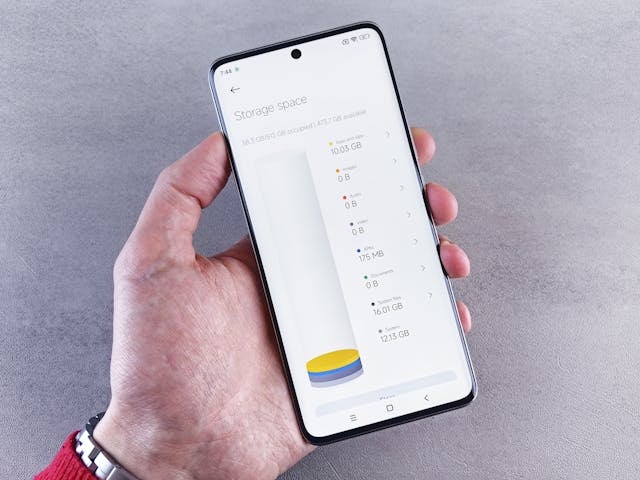
Space on your device is valuable. Periodically check how much your files and downloads take up and delete songs you no longer listen to. Before starting new downloads, make sure you have enough available space. A good practice is to keep only the playlists you listen to frequently.
Troubleshooting Common Issues
If you experience issues with your downloads, such as a failure during the process, you can try restarting the app or checking your internet connection:
- Connect your device to the internet every 30 days to keep your downloads active
- Close and reopen the app if songs won't play
- Verify that you haven't exceeded the limit of 5 linked devices
Syncing Between Devices
If you use multiple devices at once, remember that you'll need to download songs on each device you use. Downloads don't automatically sync between devices, so plan which content you'll need on each of your devices to optimize space and keep your favorite music always available.
Get Spotify Premium at a group price
Share a premium subscription through ElGrupito and save up to 70%. Check today's price in the catalogue.
See the price on ElGrupitoConclusion: Take Your Spotify Library Wherever You Go
The ability to download music from Spotify not only gives you the freedom to listen offline, but also completely transforms your music experience. Choosing the right tool is key to making the process of downloading Spotify music satisfying. Whether you opt for the Premium route or explore alternatives, what matters is finding the method that best fits your needs and budget.
Remember that the key is to efficiently organize your library and maintain a balance between sound quality and storage space. With the tools and tips provided, you're ready to create your own portable music library and enjoy your favorite music anytime, anywhere, always carrying the most personal side of your music experience with you.
✅ Get Spotify Premium at a group price with ElGrupito and enjoy unlimited downloads, no ads, and the best audio quality.
Frequently Asked Questions
To enable the download option on Spotify, you need to have a Premium account. Once subscribed, simply open the app, find an album, playlist, or podcast, and tap the download button (downward arrow) next to the content. The songs will start saving to your device, and you can play them offline by enabling "Offline mode" in settings.
To download Spotify songs to an SD card, you first need a Premium account and an SD card properly inserted and recognized by your Android device. Then, open the Spotify app, go to Home > Settings > Other > Storage, and select SD Card as the default storage location. From that point on, all music you download will be saved directly to the SD card, freeing up internal storage on your device. The content will only be accessible from the Spotify app and not as visible MP3 files.
Spotify offers music under license and only allows downloads through its own app with a paid subscription. Using online downloaders or third-party programs to save songs and playlists outside the platform constitutes an infringement, even if the content isn't commercialized.
Not all songs or podcasts on Spotify can be downloaded, even if you're already a Spotify Premium member. Although some believe it's due to decisions by certain artists, in reality this is usually related to regional limitations, copyright issues, or specific decisions by record labels. For example, an album may be available for streaming in your country, but due to licensing restrictions, you may not be able to download it. It's also possible that only some songs on an album are blocked for download. These restrictions don't always depend on the artist, but rather on commercial agreements or legal conditions imposed by those managing the music rights.