
Windows 11 Features + Price Guide
Windows 11 features and price in 2026: how much the license costs, Home vs Pro, requirements, what changed from Windows 10 and how to buy it cheaply.
Have you wondered if it's really worth making the jump to Windows 11? While many hesitate about upgrading, Microsoft's new operating system is revolutionizing the way we interact with our computers. With a completely revamped interface and features that seem straight out of a sci-fi movie, Windows 11's features promise to transform your digital experience.
Since its launch, there has been both excitement and uncertainty about Windows 11 pricing and features. But beyond the initial cost, what truly matters are the innovations it brings. Ready to discover how this new version could change the way you work and play? Join us on this tour of all its features.
New User Interface and Redesigned Look
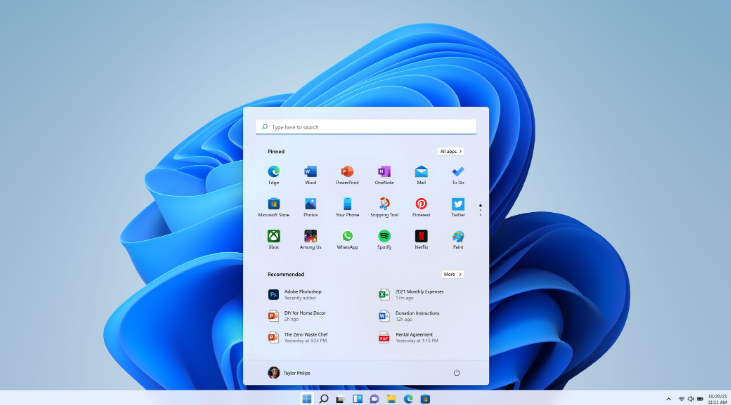
Among Windows 11's most notable features is its completely revamped interface that redefines the user experience. The Start menu and apps now look more modern and minimalist, with centered icons for a more intuitive experience. Remember the somewhat rigid Windows 10 interface? Forget it! Now you'll have a more fluid and elegant design.
The new icons are a visual delight, with smooth, modern shapes that are part of the Windows app design. The typography has also received a makeover, making it clearer and more readable than ever.
Compared to Windows 10 and 7, the difference is striking. Windows 11 embraces simplicity and visual clarity, with an interface optimized for both mouse and touchscreen use. It's like taking a leap into the future of computing!
You can get Windows 11 at a group price on ElGrupito. Check today's price
Redesigned and Improved Multitasking
Tired of having a thousand windows open with no order? Windows 11 revolutionizes the way you work with its new window layout tool. Now you can organize up to eight applications simultaneously across two screens, like a true professional!
Productivity soars with these new features. Imagine having your email, documents, and browser perfectly organized with just a couple of clicks. Users are thrilled, and rightfully so. Experts agree that these improvements make work flow more naturally and efficiently.
With these features, you'll be able to keep everything under control and boost your daily performance without complications. It's like having a personal digital assistant!
New Microsoft Store
The Microsoft Store is one of the Windows 11 features that has attracted the most attention. The loading and download speed is noticeably faster than its predecessor on Windows 10, making the app search and acquisition experience much smoother.
The redesigned store offers a broader catalogue of applications, including traditional Win32 apps, progressive web apps (PWA) and more. The new interface makes it easier to discover new apps and keep the ones you already have up to date.
As for compatibility, apps designed for Windows run like clockwork, making the most of the new interface. And don't worry about your older apps -- most work perfectly, though some may need updates. Just make sure to check the minimum requirements before installing.
Updated and Customizable Widgets
Windows 11 brings an impressive collection of widgets that will transform your desktop. From weather and news to calendar and stock tracking, these little digital helpers keep all important information at a glance.
Want to customize your widgets? It's super easy! Just click the widget icon on the taskbar, select the "+" button, and choose the ones that interest you most. You can drag and rearrange them to your liking to create the perfect information panel.
Better Touch Experience
Windows 11 has made a giant leap in touch experience with more natural gestures and instant response. Larger buttons and an improved virtual keyboard make using your device with your fingers as intuitive as on your smartphone.
The smoothness of swiping and zooming feels as natural as iOS or Android. In fact, some actions like switching between apps or accessing widgets are even smoother than on traditional tablets.
Have a 2-in-1 device? Here are some tips: enable automatic tablet mode in settings, customize touch sensitivity to your preferences, and use the new multi-touch gestures to maximize your productivity. You can also configure window groups to quickly access your favorite Windows apps with a single tap.
Performance Optimizations
Windows 11 brings spectacular improvements in memory management that make everything run like silk. The system is now smarter at handling resources, especially when using an SSD, which means faster boot times and apps that open in the blink of an eye.
Notice the difference from Windows 10? It's like comparing a sports car to a sedan! Tests show that Windows 11 is noticeably faster and more intuitive, especially for everyday tasks like web browsing and applications.
Users who have upgraded to an SSD are thrilled. "My PC feels brand new" is a common comment in forums. And it's no wonder -- the combination of Windows 11 with a modern SSD makes your computer fly. Loading times are minimal and system response is instant. It's like giving your computer superpowers!
If you need a system designed to maximize stability and performance in critical scenarios, Windows 11 LTSC is the perfect choice. This system guarantees smooth operation without unnecessary interruptions.
System Requirements and Compatibility
Ready to make the jump to Windows 11? First, make sure your equipment meets the minimum requirements: you'll need a 64-bit processor, 4 GB of RAM, and 64 GB of disk space. Oh! And don't forget that your graphics card must be compatible with DirectX 12 or higher.
An important note: Windows 11 has definitively said goodbye to 32-bit support. If you have an older system, you'll need to upgrade your hardware to enjoy this new version.
Worried about compatibility issues? The most common ones tend to be with older hardware and specific software. We recommend using Microsoft's compatibility checker tool before upgrading. If your PC is from the last 4-5 years, you probably won't have any problems. And remember to make a backup before upgrading!
Windows 11 Pro vs Home
Torn between Windows 11 Home and Pro? Let us help you decide! If you need advanced features like Remote Desktop, Hyper-V, or BitLocker, you should consider buying Windows 11 Pro, as it's designed for professional users and businesses that need maximum security and control. On the other hand, Home has everything you need for personal use and entertainment.
For individual users, the Home version is perfect -- it has a more affordable price and all the essential features you need. But if you work with sensitive data or need to manage computers remotely, Pro is your best investment.
Windows 11 Price

Note: Prices may vary depending on the distributor and current promotions.
If you are looking for a genuine license, you can get Windows 11 at a group price on ElGrupito, with 100% legal licenses and multiple payment methods.
Windows 11 LTSC (Long-Term Servicing Channel)
LTSC is the most robust version of Windows 11, specifically designed for critical environments where stability is essential. Imagine a system that runs without interruptions for years -- that's LTSC!
Unlike regular versions, Windows 11 LTSC receives fewer feature updates but more critical security patches. This means greater stability and less risk of an update affecting the operation of your essential systems. It's like having a digital bodyguard 24/7!
This version is perfect for data centers, industrial control systems, and medical equipment. For example, imagine a hospital where equipment cannot afford downtime -- that's where LTSC shines. It's also ideal for ATMs, traffic control systems, and any environment where reliability is paramount.
Key Differences from Windows 10
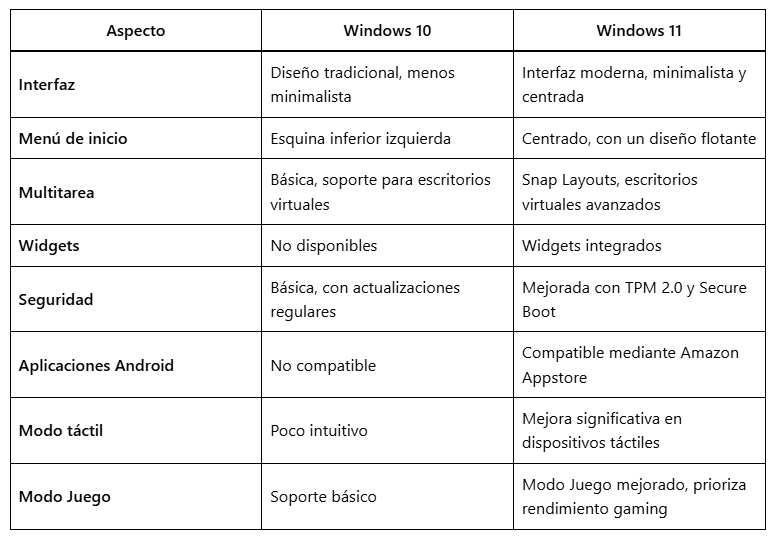
Get Windows 11 at a group price
Share a premium subscription through ElGrupito and save up to 70%. Check today's price in the catalogue.
See the price on ElGrupitoInstallation Guide: Requirements and Initial Steps
Eager to install Windows 11? Follow these steps for a hassle-free installation:
- Check the system requirements: TPM 2.0, UEFI and Secure Boot enabled, at least 64 GB of free disk space and a stable internet connection (especially for the 24H2 edition).
- Prepare the installation media: download the official ISO from the Microsoft website and create a bootable USB with the Media Creation Tool.
- Optimize your PC before starting: back up your important data, update your drivers and disconnect unnecessary external devices to avoid conflicts.
- Extra tip: Get a genuine license to avoid activation issues. On ElGrupito you can get one at a group price.
Having problems during installation? The most common are TPM 2.0 or Secure Boot errors. The solution is usually as simple as enabling these features in the BIOS. And if you see the message "This PC can't run Windows 11," verify that your hardware meets the minimum requirements.
Conclusion: Is It Worth Upgrading to Windows 11?
After analyzing all of Windows 11's features in detail, it's clear that Microsoft has made a significant qualitative leap in the evolution of its operating system. The combination of a modern interface, significant performance improvements, and new features makes upgrading more than tempting, especially if you get it at a group price on ElGrupito.
If your system meets the minimum requirements, upgrading to Windows 11 can completely transform your digital experience. And with the group price you'll find on ElGrupito, there has never been a better time to make the jump. Don't miss the opportunity to modernize your PC with the latest Microsoft technology!